[HAI5016] Spring Semester Onboarding

If you have decided to continue with this semester’s Human-AI Interaction in Data Science course after the the orientation session, make sure to follow and complete the steps below before next class:
- 1. Fill in the class survey
- 2. GitHub Student Developer Pack
- 3. Sign up for Azure for Students
- References
1. Fill in the class survey
To arrange grouping and the weekly presentation schedule, please fill in the survey by March 8th (Sunday):
- cut
To access the Google Form, make sure you are logged in with your SKKU Google account (@g.skku.edu). You can find a draft list of the presentation topics here. The final schedule will be shared in the next class.
2. GitHub Student Developer Pack
We will be using several GitHub services during the semester, among them GitHub Copilot, GitHub Codespaces, and GitHub Models, which are available for free to students who sign up for the GitHub Student Developer Pack.
Create a GitHub Account and Enable 2FA
- Create a GitHub account if you don’t already have one
- Use your university email address when signing up to simplify the student verification process
- Ensure your public profile name matches the name on your student ID (you can update this later if needed)
- Enable 2-factor authentication (2FA) on your GitHub account. This is a requirement for accessing the Student Developer Pack benefits.
- Go to https://github.com/settings/security?notice=low_two_factor_methods to check if 2-factor authentication is enabled.
- If not, enable it by using an authenticator app (e.g., Google Authenticator, Authy) or passkey. More info here
If you do not have an OTP/Authenticator app on your phone already (such as Google Authenticator, Authy, etc.), you can use the built-in passkey feature on your phone or PC to enable 2FA for GitHub. When you set up 2FA on GitHub, choose the option to use a passkey instead of an authenticator app. This will allow you to authenticate using your phone’s biometric features (like fingerprint or face recognition) or a PIN, without needing to install a separate app.
Sign up for the GitHub Student Developer Pack
To verify your student status and get access to the services, follow these steps:
Make sure you have 2-factor authentication enabled on your GitHub account (see instructions above)
- Prepare your proof of enrollment document:
- Make sure you have a printed version of your university’s enrollment document or ID
- It must include your name, university name, a school official’s signature or stamp, and a valid date (e.g., current semester or academic year)
- If you are an SKKU student, you can get a printed version of your enrollment document at the digital certificate kiosk in the entrance hall of the International Hall lobby
- Sign Up for the GitHub Student Developer Pack:
- Go to GitHub Student Developer Pack
- Click “Get Student Benefits” and follow the instructions to verify your student status
- You will need to take a photo of your enrollment paper document as proof
- Make sure that your university logo can be seen clearly in the photo, as well as your name and the enrollment period date. If the document is not clear, your application might be rejected.
- Wait for Approval:
- Approval is often immediate, but verification may take a few days. You’ll receive an email once it’s approved
- You can check the status of your application in the GitHub Education dashboard
- If your request is denied, check GitHub’s guidelines and try again with a clearer document
Whenever signing up for student benefits, you should never have to provide any payment/credit card information. If you are asked to provide payment information, you may have accidentally signed up for a regular trial instead of a student pack. In this case, please start over again and make sure to carefeully follow the instructions.
3. Sign up for Azure for Students
During this course we will touch on the basic concepts of cloud computing and explore several models in the Microsoft Foundry platform. Use the link below to subscribe and make sure to check if you received the $100 credit that we will use to pay for inference of the Large Language Models on Azure.
- Use your university or school email to sign up via https://azure.microsoft.com/free/students
- Whenever asked for address information, you may use the university address
- After completing the sign-up process, check if your student benefits were activated correctly via https://portal.azure.com/#blade/Microsoft_Azure_Education/EducationMenuBlade
If your credit was activated successfully, your Education pane should look like this: 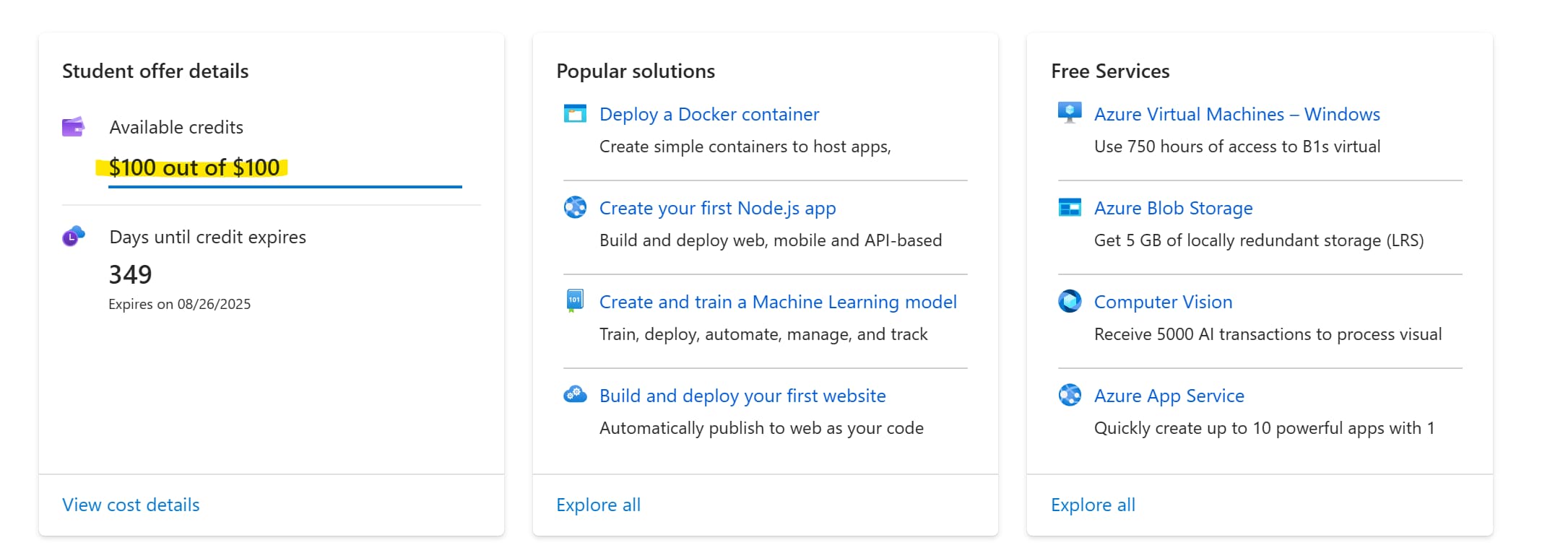
If you have signed up for Azure before, make sure to check your existing [credits and usage].
References
GitHub
- GitHub Signup
- GitHub Security Settings - 2FA
- GitHub 2FA Documentation
- GitHub Student Developer Pack
- GitHub Education Dashboard
Microsoft Azure for students